The problem
Engineering offices need one reliable workspace for project files, drawings, client and consultant records, invoices, and site-visit updates instead of losing context across computers and chat apps.
Projects, clients, drawings, field visits, documents, invoices, notes, and controlled design-file workflows.
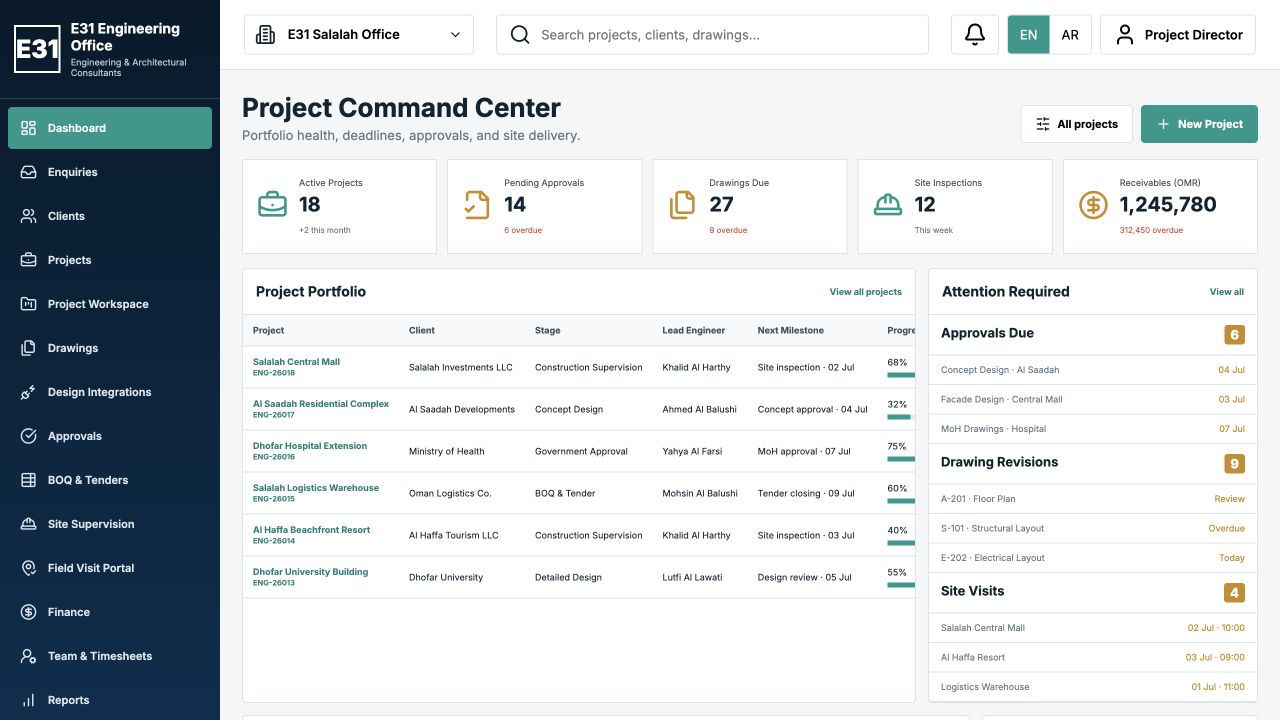
Engineering offices need one reliable workspace for project files, drawings, client and consultant records, invoices, and site-visit updates instead of losing context across computers and chat apps.
E31 Engineering Office keeps every project's documents, drawing revisions, field notes, invoices, approvals, and imported design files together in a controlled workspace.
Practical modules designed for daily operations.
Open one project to review its contacts, drawings, documents, invoices, visits, and recent activity.
Keep client, consultant, owner, and project contact details in structured records.
Track drawing numbers, revisions, disciplines, review status, and supporting documents.
Upload site photos, notes, documents, and invoices directly to the selected project.
Keep financial documents and operational notes attached to the project that produced them.
Import approved DWG, DXF, RVT, IFC, and PDF files through the configured desktop or cloud workflow.
Select the platform that matches your team and deployment requirements.
Choose the closest plan, then confirm users, branches, migration, integrations, and training with E31.اختر الباقة الأقرب ثم أكّد عدد المستخدمين والفروع ونقل البيانات والتكاملات والتدريب مع E31.
OMR 360 / year / سنوياً
First year from OMR 510 including setup. Renewal from OMR 360.السنة الأولى من 510 ر.ع شاملة الإعداد. التجديد من 360 ر.ع.
OMR 720 / year / سنوياً
First year from OMR 870 including setup. Renewal from OMR 720.السنة الأولى من 870 ر.ع شاملة الإعداد. التجديد من 720 ر.ع.
OMR 1,200 - 1,800 / year / سنوياً
First year from OMR 1,350 including setup. Renewal from OMR 1,200.السنة الأولى من 1,350 ر.ع شاملة الإعداد. التجديد من 1,200 ر.ع.
Setup:الإعداد: OMR 150, normally paid 50% / 30% / 20% by implementation milestone.150 ر.ع، وتُدفع عادةً بنسبة 50% / 30% / 20% حسب مراحل التنفيذ.
Role-aware access, server-side input validation, protected administration routes, activity logs, and controlled sessions are available in the E31 platform. Final controls, encryption, backups, retention, and recovery depend on the selected deployment scope and customer configuration.
Review the security approachE31 can scope users, roles, branches, imports, reports, devices, and supported data connections around the customer's operating workflow. Integrations are confirmed during technical discovery before deployment.
Ask about implementationReview the live dashboard, project workspace, field visit portal, and controlled design-file import workflow.
Review the public preview first, then complete quick email verification to open a private workspace for 30 minutes.راجع المعاينة العامة أولاً، ثم أكمل تحققاً سريعاً عبر البريد لفتح مساحة عمل خاصة لمدة 30 دقيقة.
Start Verificationابدأ التحققBook a demonstration and discuss users, modules, branches, and customization.
Product and deployment questions.
Yes. Field users can attach photos, notes, documents, and invoices to the selected project when the portal is enabled.
A configured Windows helper can scan approved folders and propose the project, document type, and revision before import.
Design files can be imported and organized through the connector-ready workflow. Native API automation depends on supported vendor APIs, licensing, the desktop connector, and the agreed deployment scope.
A quick verification is required to open the private workspace. The private session remains available for 30 minutes from the start time. Separate downloadable evaluations, when available, remain valid for three days.يلزم تحقق سريع لفتح مساحة العمل الخاصة. تبقى الجلسة الخاصة متاحة لمدة 30 دقيقة من وقت البدء. أما نسخ التقييم المنفصلة القابلة للتنزيل، عند توفرها، فتبقى صالحة لمدة ثلاثة أيام.
Yes. E31 can scope modules, reports, users, and workflows for your company.